 Ely Tea Party
v0.3.14 Free · Open source · macOS / Windows / Linux
Code is running,
Tea is ready
A warm, native terminal for Claude Code, Codex, Gemini and friends.
Who’s working, who’s thinking, who’s waiting on you: one glance tells.


Every session
gets a face
The command line stays at the center. Characters, status, Git and files sit right beside it.
- 1
No more “is it done yet?”
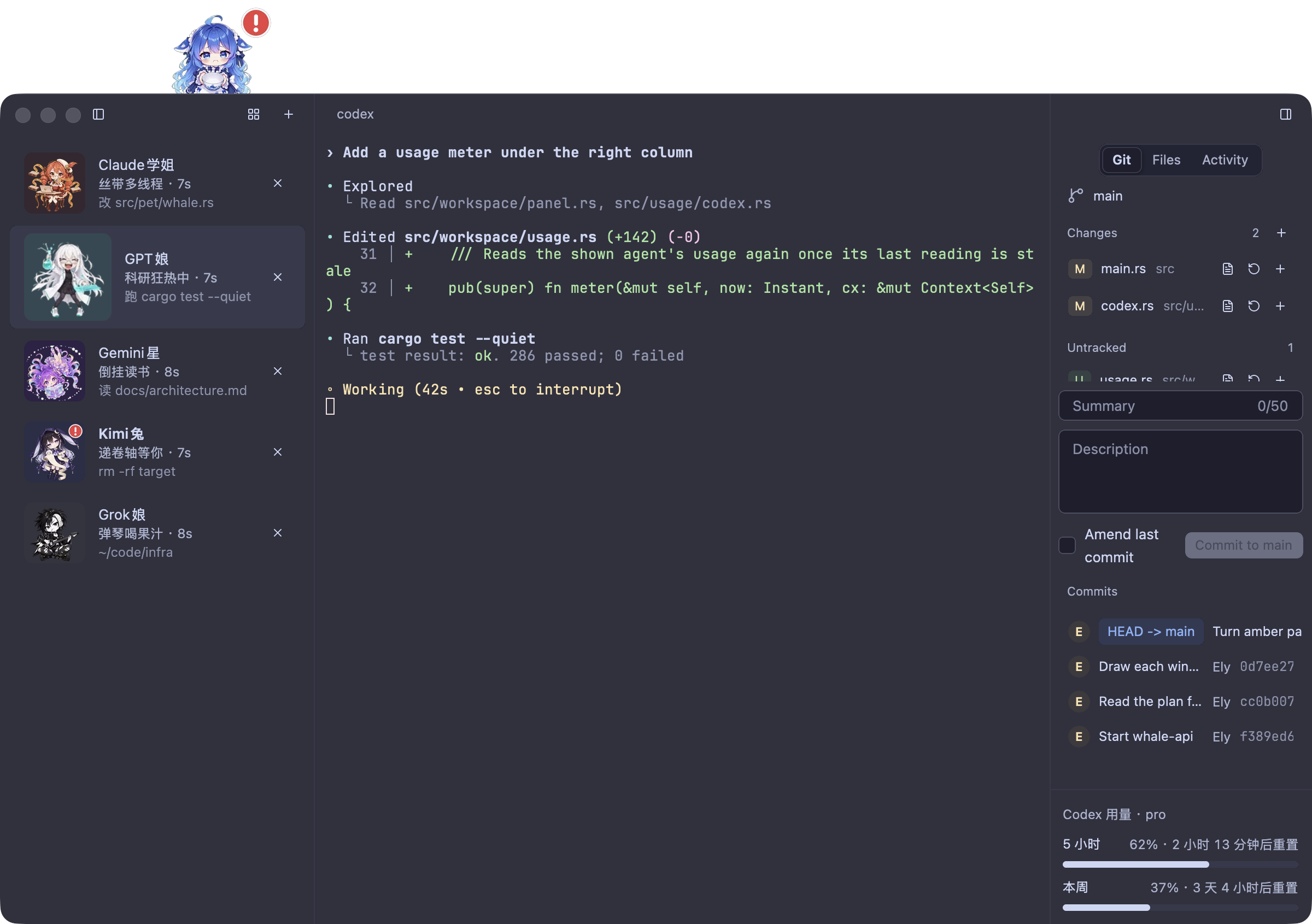
With agent hooks installed, each character follows her task. Take Kimi in the sidebar: a red “!” over her head and a scroll held out. She’s waiting for your answer.
- 2
The whale girl watches from the window
When someone needs you, she raises a “!” too. Click her: the sessions waiting on you come first, one click from their terminal.
- 3
Cute, and serious about work
Git changes and commits, files, an activity timeline and Codex usage live in the right column. Sessions resume, and a drawer terminal runs a quick command.
Who’s coding with you today?
Eight old friends, each busy in her own way. Pick one to see what she gets up to.
Leave it to senpai~

01 / 08
Claude Senpai
Bring your own friends too: import an image or an .elyskin pack in Settings → Characters to replace anyone. How to make a skin ↗
Pull up a chair for your next session.
v0.3.14 See the changelog
macOS
Apple silicon · macOS 11+
Open the disk image and drag Ely Tea Party into Applications. Signed and notarized by Apple.
Download .dmgWindows
x86_64 · Windows 10+
Unzip and run ely-tea-party.exe. Not signed yet, and the Windows build can’t detect agent characters yet.
Download .zipLinux
x86_64 · glibc 2.35+
Unpack and install; needs libxkbcommon, libxkbcommon-x11 and libxcb. Install steps ↗
Download .tar.gzDownloads come from GitHub Releases · Free to use · MIT licensed · SHA256 checksums ↗
First time?Install and open ElyStart the coding agent you already useInstall hooks in Settings → Terminal → Agent hooks, then restart the agent
Before you sit down
Good to know
Is this a new AI model?
No. Ely Tea Party is a native terminal; you keep using your own Claude Code, Codex, Gemini and other tools with their own accounts. Ely turns each session’s status into an animated character and adds session management, Git, files and activity.
Do I need an API key?
Not for the terminal, the characters or the local task cards. Your coding agent signs in its own way. The whale girl’s AI explanations and suggestions are optional, and only they need a model provider set up.
Can I use my own characters?
Yes. In Settings → Characters, import PNG, APNG, GIF or WebP images or a full .elyskin pack, with a different animation for each pose. You can export your pack to share with friends; a skin marketplace on this site isn’t open yet.
How does it relate to ELYTerminal?
Ely Tea Party is a fork of ELYTerminal, made with its author’s permission. The terminal underneath and the original design come from Zachary Zhang and ELYTerminal; this fork adds the coding agent characters, the whale girl and their workflows. Meet the original ↗